

Nino’s beta brought an account overview, AI-assisted financial questions, and human financial and tax support into one service. The first version focused on decisions that cross account boundaries: what to do with stock options, how a purchase affects cash, and how a financial choice changes the tax bill.
This post documents the beta launch. The screenshots show that version; the final section explains the software and services choices available today.
What our users kept telling us
People wanted to see their accounts together, understand their equity awards, and know what a major decision would leave them with after taxes. They also wanted professional help that used the same household information, without retelling the whole story each time.
Those needs shaped the beta’s account overview, spending information, equity scenarios, and tax planning connected with filing. AI helped people explore questions. The human team provided financial and tax support.
The connection mattered. An equity decision might look attractive in a stock-price chart but leave too little cash for a tax payment or a house purchase. We wanted the household’s other plans in view while considering the transaction.
The question we get most: “What do I do with my options?”
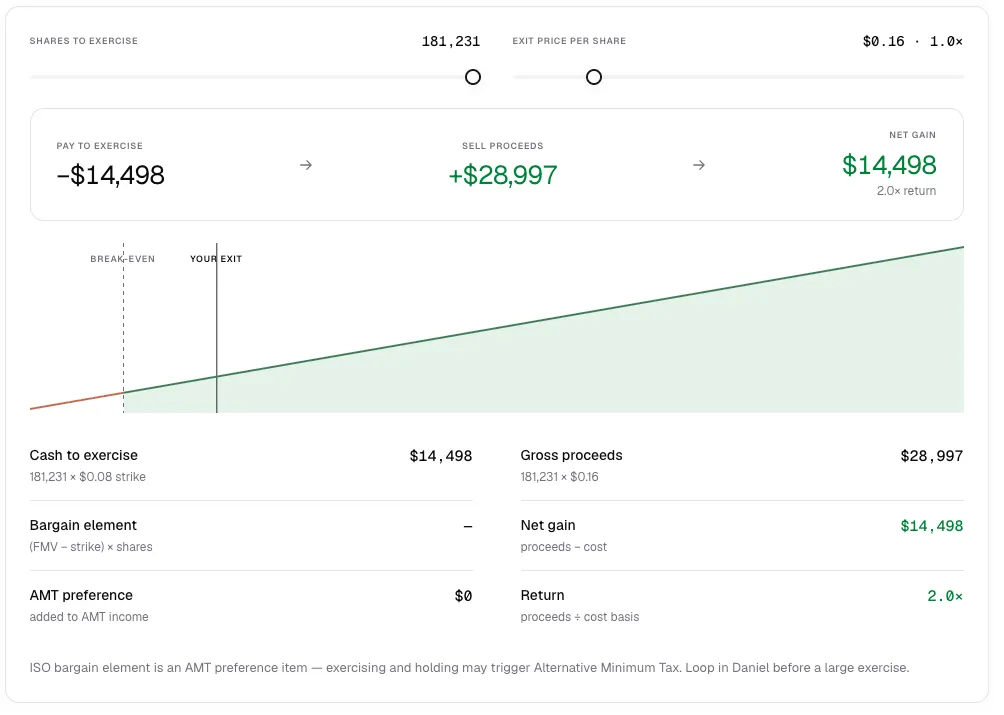
The beta’s Simulate tab showed the arithmetic behind an equity decision. Its example used 181,231 options, a $0.08 strike, and a hypothetical sale price of $0.16:
| Step | Calculation | Amount |
|---|---|---|
| Buy the shares | 181,231 × $0.08 | $14,498.48 |
| Sell the shares | 181,231 × $0.16 | $28,996.96 |
| Gain before taxes and fees | Proceeds minus purchase payment | $14,498.48 |
That is a 100% gain on the purchase payment before taxes and fees. It is not the amount necessarily available to spend. The sale must be permitted, and the option type and timing change the tax result.
The example also raised questions the price calculation could not answer: which shares had vested, when the options expired, what current valuation applied, and how much wealth was already tied to the company. A future expiration date leaves time to decide, but does not by itself establish that waiting is best.
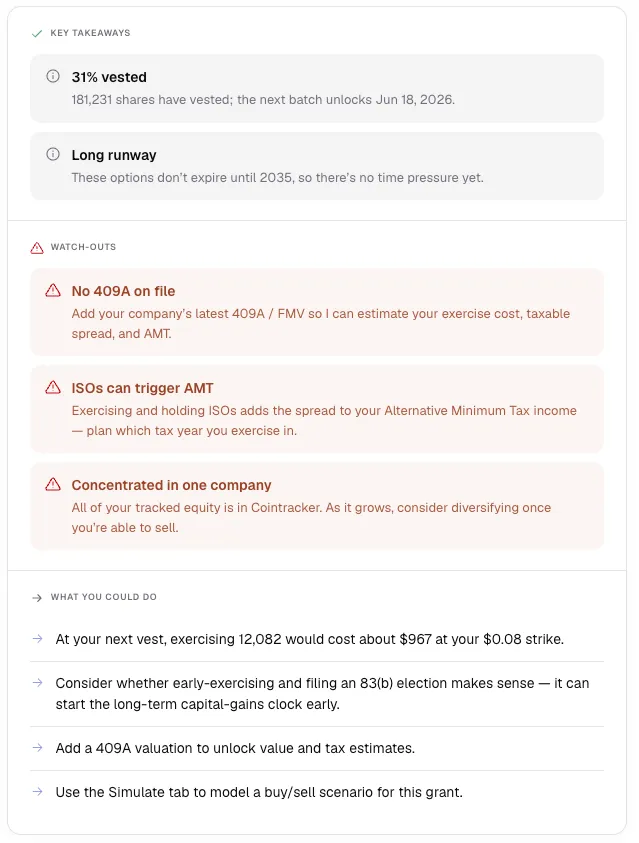
For ISOs, exercising and holding can create alternative minimum tax before a sale. Early exercise of unvested shares adds separate election and timing questions. The IRS stock-option guidance and Form 6251 instructions explain why a screen’s estimated gain is only one part of the decision.
What changed after the beta
Today, you can choose how much help you want:
- AI software: Connect accounts, bring financial information together, ask questions, and explore projections yourself.
- AI software + services: Add a human CPA and CFP team to build your financial plan, handle tax planning and filing, and help put the plan into action.
The beta screenshots remain here as a record of the launch. For today’s features, plan details, and trial terms, see current plans.